
On this page
Task guides
Device and App emulation
Choose the environment that matches what you need to verify.
Test a mobile viewport
Pick a device preset for viewport size, device pixel ratio, user agent, and touch. Replace the sample tabId with your target. Use the Device Shell when you need system bars and a framed WebView. Set a time-zone override separately with set_timezone.
mearl set_device_emulation --payload '{"tabId":12345,"enabled":true,"preset":"iphone-17-pro"}'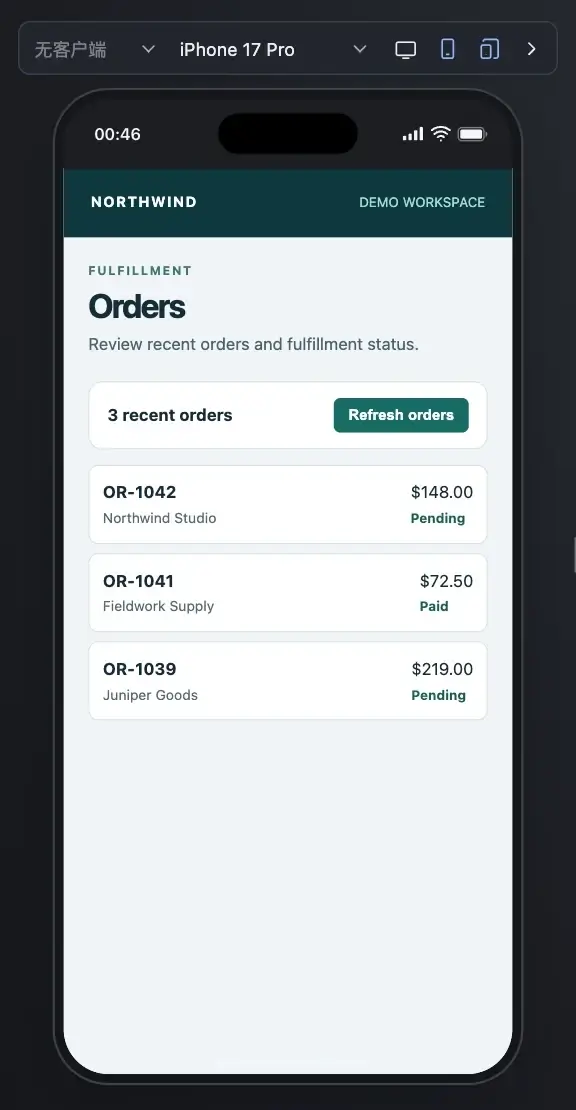
Use App WebView emulation
Capability packages provide App emulation configurations. Query the target browser’s profile catalog to find supported IDs and options for user agent, JSBridge behavior, and WebView setup. Bridge responses simulate page-visible behavior. Native sign-in or payments depend on separately available capabilities.
- Open the page you want to test in a regular browser and capture its layout and available actions.
- Install the WeChat profile and select WeChat web page emulation. Reload the page and check the behavior that depends on the User-Agent or JSBridge.
- With the device shell enabled, use the bottom gesture bar to switch to WeChat mini-program web page. An Agent can use set_app_profile with the ID returned by get_capabilities.
mearl set_app_profile --help

Run a local WeChat mini-program
The WeChat mini-program Skill runs native projects and compiled WeChat output from frameworks such as Taro and uni-app. Open the local preview to switch devices, inspect the page and navigation stack, or mock WeChat APIs and responses. Each run compiles once and opens a local file. Run the project again to update the preview after changes. For a web page inside WeChat, use WeChat H5 emulation.
- For ChineseBQB-weapp, install the project dependencies and run npm run build:weapp to generate dist. The Skill also accepts a native mini-program project directly.
- Install the Skill and run the command below from the project root. With the Chrome extension, allow file URL access and user scripts as described in the runtime guide.
- Open a sticker pack in the preview and check that the page changes and renders the stickers.
npx @mearl/setup plugin install mearlhq/profile-wechat --github --skill wechat-miniprogram
mearl wxa run ./dist

Apply before navigation when it matters
Pass emulation or appProfile to tab_open when a new page must see the environment on its first load. For an existing tab, apply the corresponding setting and use the response to verify the viewport and profile. Clear the setting explicitly when you want to restore the tab.
- For a mobile checkout layout, run the same steps at desktop size and at the target device preset. Capture the point where the layout changes.
- If the difference only appears inside an App, load its installed profile before navigation. Check the User-Agent or JSBridge behavior the page uses to choose its layout.
- Repeat the same steps after the fix and compare the screenshots and request results.
Create an App Profile
Use the mearl-profile-creator Skill to build or update emulation for an App WebView. Give your agent an existing definition, a client behavior sample, or the relevant documentation, plus the behavior your H5 page needs.
- Define the User-Agent and version. Add a page runtime to implement JSBridge callbacks or container interactions when needed.
- Build a browser capability package that lists the profile under contributions.appProfiles. Add an App ID mapping if a Preset will select the implementation.
- Install the package in a test browser, find its ID with mearl get_capabilities, and open a fresh tab with the profile enabled to verify first-load behavior.
npx skills add https://github.com/mearlhq/mearl --skill mearl-profile-creator --globalOpen source credits
The WeChat mini-program Skill uses wxa-runner (MIT). The screenshots show F-loat’s ChineseBQB-weapp (MIT). Tencent’s WeChat base library is a separate dependency and retains its own terms.